
Open the wishlist settings
In Shopify’s Theme Editor, open App embeds → Wishlist setup for the theme you want to configure.
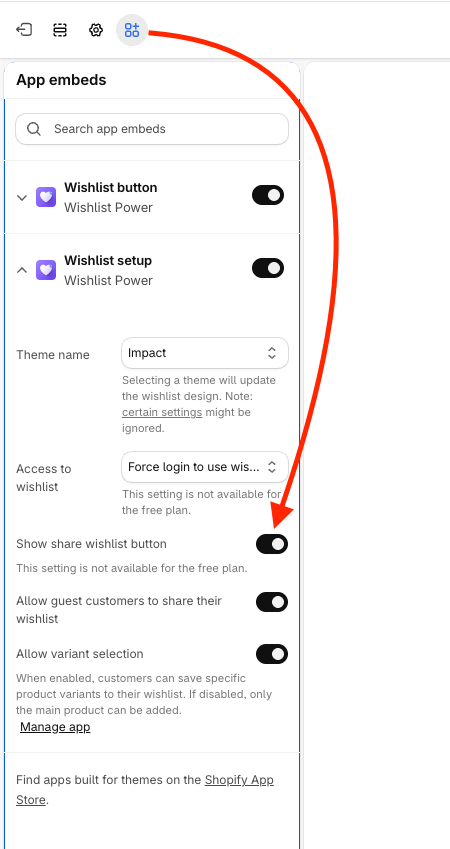
Configure wishlist sharing
Choose your sharing settings in the app embed:
| Setting | What it does |
|---|---|
| Show share wishlist button | Displays the share button on the wishlist page. Turn it off to hide the button. |
| Allow guest customers to share their wishlist | Allows customers who are not logged in to share their wishlist. |
Show share wishlist button is not available on the free plan.
Allow guests to share
To let customers share a wishlist without logging in:
- Set Access to wishlist to Open to all visitors (guest and registered users).
- Enable Show share wishlist button.
- Enable Allow guest customers to share their wishlist.
For more about access options and plan availability, see Choose who can use your wishlist.
Save and check
Click Save in the Theme Editor, then open your wishlist page on the storefront to check the share button. If you enabled guest sharing, also try it while logged out of your customer account.
If you haven’t created the page yet, follow Create a wishlist page.